You can turn a profit on paper and still come up short on payday. That gap is where most small businesses get hurt, and it is exactly what cash flow forecasting software exists to catch. A forecast is the early warning system that tells you a squeeze is coming while you still have time to act. Plenty of owners never build one. They glance at the bank balance on a Monday and call it planning.
The catch is that most software in this market is paid, and most lists of free options are padded with 14-day trials. This guide sticks to the tools that genuinely cost nothing, what each one can and cannot do, and the point where a paid tool starts to earn its keep.
What cash flow forecasting software actually does
Every forecasting tool, from a simple spreadsheet to a full cash flow projection tool, answers one plain question. How much cash will sit in your account in 30, 60 and 90 days, once every bill, wage and late invoice has cleared? Get that right and you can spot a shortfall while you still have room to move. Chase an invoice early. Delay a purchase. Arrange an overdraft before you need it, not the week it bites.
Most SMEs handle this badly because they treat the bank balance as cash flow. The balance tells you about today. It says nothing about the VAT bill due in three weeks or the customer who always pays 20 days late. A forecast joins those dots.
What counts as genuinely free
One filter saves you a lot of reading. Free in this market means one of three things: free forever, included in software you already pay for, or a trial that expires. Only the first two cost nothing. The comparison below sticks to those, with the trial-only tools flagged for what they are.
Free cash flow forecasting software compared
| Tool | Genuinely free? | Forecast horizon | Best for |
|---|---|---|---|
| Spreadsheet template (Excel or Google Sheets) | Yes, free forever | As far as you build it | Simple businesses under £500k turnover |
| QuickBooks Cash Flow Planner | Included with QuickBooks Online | Around 90 days | Existing QuickBooks users |
| Xero short-term cash flow | Included with Xero | 30 days | Quick checks for Xero users |
| Float, Cash Flow Frog, Agicap | Trial only, then paid | Months to years, with scenarios | Stock, currencies, volatile cash |
A spreadsheet template. The most flexible genuinely free option, and it works in Excel or Google Sheets. Capitalise, Brixx and Smartsheet all offer free cash flow forecast templates. You enter your opening balance, expected money in and expected money out, and the sheet rolls a closing balance forward each week or month. It costs nothing and you control every line. The trade-off is manual entry, and one broken formula can throw the whole thing off.
The QuickBooks Cash Flow Planner. If you already pay for QuickBooks Online, the planner is included at no extra cost. It pulls your real data, projects roughly 90 days ahead, and lets you test one-off scenarios without touching your books. It is only free in the sense that you are already paying for QuickBooks.
Xero short-term cash flow. Also built in and free with a Xero subscription. It is honest but narrow: a 30-day view with no scenario planning. Handy for a quick look, useless for planning a year.
Which free option fits your business
If you run a service business under £500,000 turnover with simple, predictable costs, a free spreadsheet template is usually enough. You will understand your numbers better for having built it by hand.
If you already run QuickBooks or Xero, start with the built-in tool before paying for anything. Plenty of owners buy an add-on they never needed.
When free stops being enough
If your cash swings hard month to month, you hold stock, or you juggle several currencies, a spreadsheet will creak under the strain. That is when paid cash forecasting software earns its keep. Float, Cash Flow Frog and Agicap connect to your accounts and model scenarios properly. None are free beyond a trial. Float starts at around 59 dollars a month and Cash Flow Frog from roughly 19 dollars, so check the current pound price on each site, and use the trial to test one against a real month before you commit.
What the software will not do for you
No forecast predicts the future. It projects your assumptions forward, so a tidy chart built on hopeful guesses is just an optimistic guess with better formatting. The software will not chase your debtors, decide whether to delay a hire, or warn you that a new contract is priced too low. It shows you the gap. Closing it is still your judgement, and a forecast is only as good as the discipline of updating it every week.
Free cash flow forecasting software: common questions
Is there completely free cash flow forecasting software?
Standalone tools that are free forever are rare. The genuinely free routes are a spreadsheet template, or the forecasting features already included in QuickBooks and Xero. Most other free software is a trial with a clock on it.
Can I forecast cash flow in Excel or Google Sheets for free?
Yes. Free templates from Capitalise, Brixx and Smartsheet handle it well for straightforward businesses. The discipline of updating the sheet every week matters more than which template you pick.
Do QuickBooks and Xero include cash flow forecasting?
Both do, at no extra cost. QuickBooks Online includes the Cash Flow Planner, which looks about 90 days ahead and supports simple scenarios. Xero’s built-in view covers 30 days with no scenario planning.
What is the best free cash flow forecast software in the UK?
It depends what you already pay for. QuickBooks users should start with the Cash Flow Planner, Xero users with the built-in view, and everyone else with a spreadsheet template. If you hold stock or your cash swings hard, trial a paid tool like Float instead.
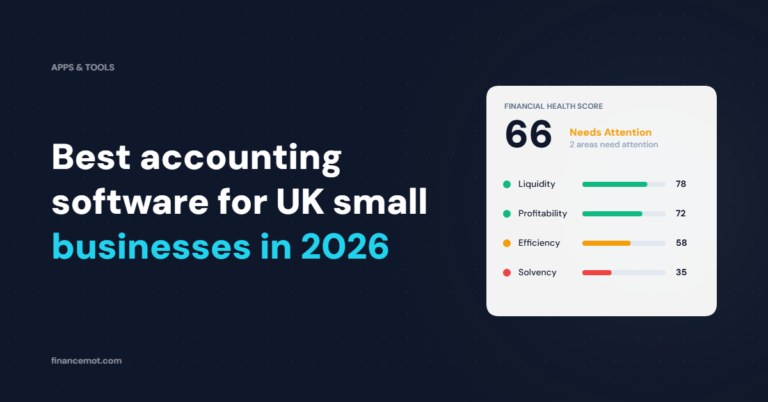
A forecast shows you where cash is heading. It does not tell you whether the business underneath it is healthy, or what to fix first. FinanceMOT reads your numbers across the four pillars of Liquidity, Profitability, Efficiency and Solvency, then turns them into a financial health score out of 100 with plain-English KPI signals. Use a forecasting tool to watch the runway, and FinanceMOT to understand why the runway looks the way it does. The two work well side by side.